> ## Documentation Index
> Fetch the complete documentation index at: https://jugarmu.com/ayuda/llms.txt
> Use this file to discover all available pages before exploring further.
# ¿Cómo edito stats y zen?
> Modificar campos y Guardar
## Miralo en la captura
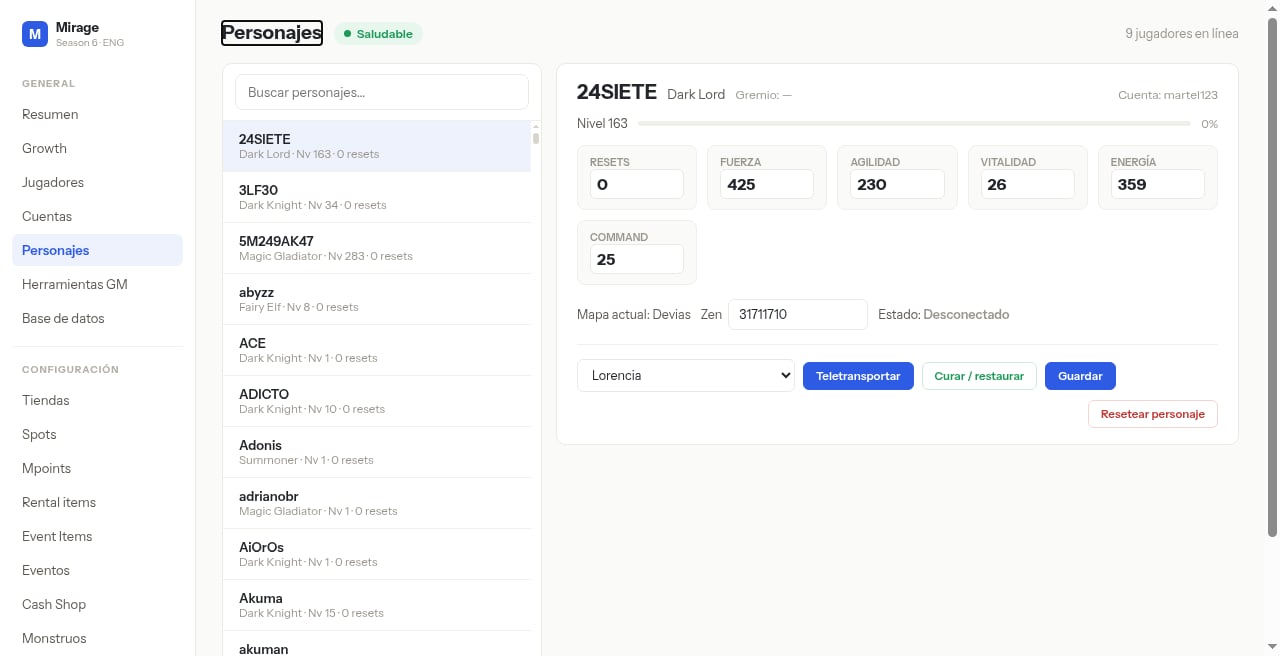 En esta pantalla fijate en la grilla de atributos y el botón azul **Guardar**.
## Qué hacer
Seleccioná el personaje.
Modificá los campos numéricos que necesitás (resets, stats, zen).
Pulsá **Guardar**.
Verificá en juego o volviendo a buscar el personaje.
## Si ves esto…
| Síntoma | Qué revisar |
| ------------------- | -------------------------------------------------------------- |
| COMMAND no aplica | Campo típico de Dark Lord; otras clases pueden mostrarlo en 0. |
| Guardar no persiste | Verificá permisos de tu sesión. |
En esta pantalla fijate en la grilla de atributos y el botón azul **Guardar**.
## Qué hacer
Seleccioná el personaje.
Modificá los campos numéricos que necesitás (resets, stats, zen).
Pulsá **Guardar**.
Verificá en juego o volviendo a buscar el personaje.
## Si ves esto…
| Síntoma | Qué revisar |
| ------------------- | -------------------------------------------------------------- |
| COMMAND no aplica | Campo típico de Dark Lord; otras clases pueden mostrarlo en 0. |
| Guardar no persiste | Verificá permisos de tu sesión. |