> ## Documentation Index
> Fetch the complete documentation index at: https://jugarmu.com/ayuda/llms.txt
> Use this file to discover all available pages before exploring further.
# ¿Cómo busco un jugador?
> Filtro por nombre, clase o mapa
## Miralo en la captura
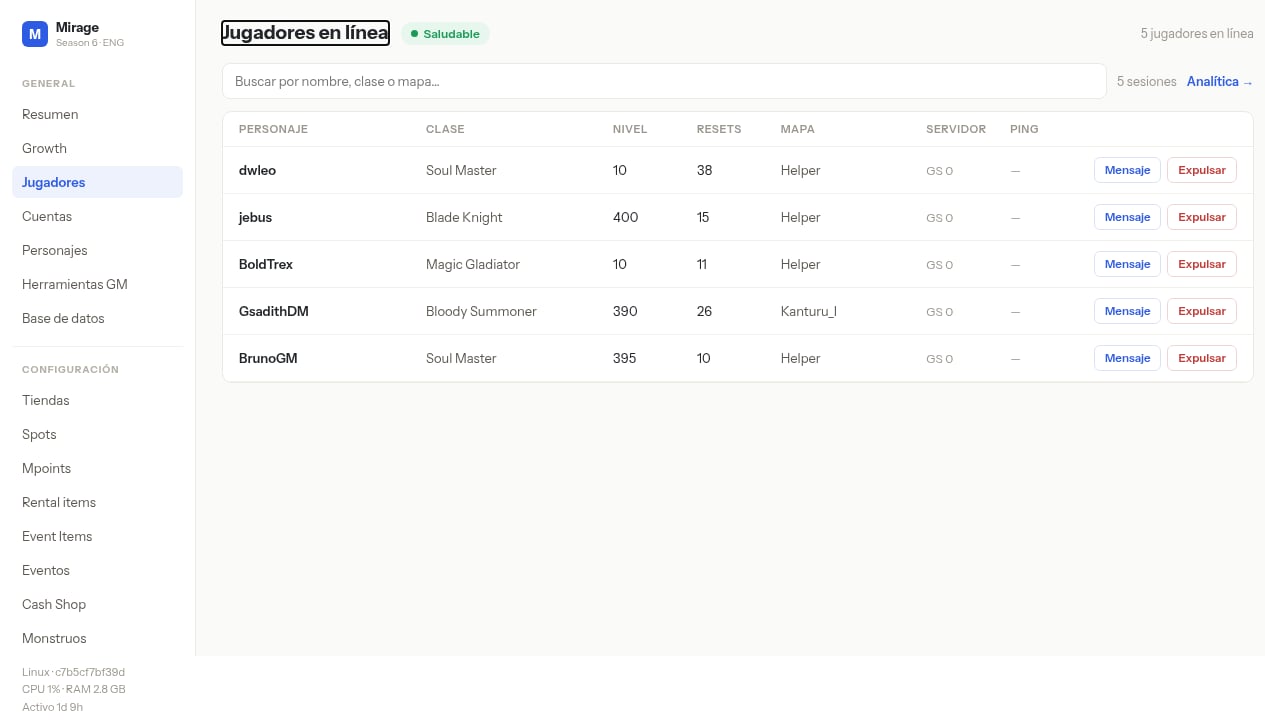 En esta pantalla fijate en el campo ancho arriba de la tabla: **Buscar por nombre, clase o mapa…**. Filtra las filas que ves debajo.
## Qué hacer
Andá a **GENERAL → Jugadores**.
Escribí nombre, clase o mapa en **Buscar por nombre, clase o mapa…**.
Revisá la fila filtrada: nivel, resets, mapa, servidor, ping.
En esta pantalla fijate en el campo ancho arriba de la tabla: **Buscar por nombre, clase o mapa…**. Filtra las filas que ves debajo.
## Qué hacer
Andá a **GENERAL → Jugadores**.
Escribí nombre, clase o mapa en **Buscar por nombre, clase o mapa…**.
Revisá la fila filtrada: nivel, resets, mapa, servidor, ping.