> ## Documentation Index
> Fetch the complete documentation index at: https://jugarmu.com/ayuda/llms.txt
> Use this file to discover all available pages before exploring further.
# ¿Cómo envío un anuncio inmediato?
> Formulario Enviar anuncio
## Miralo en la captura
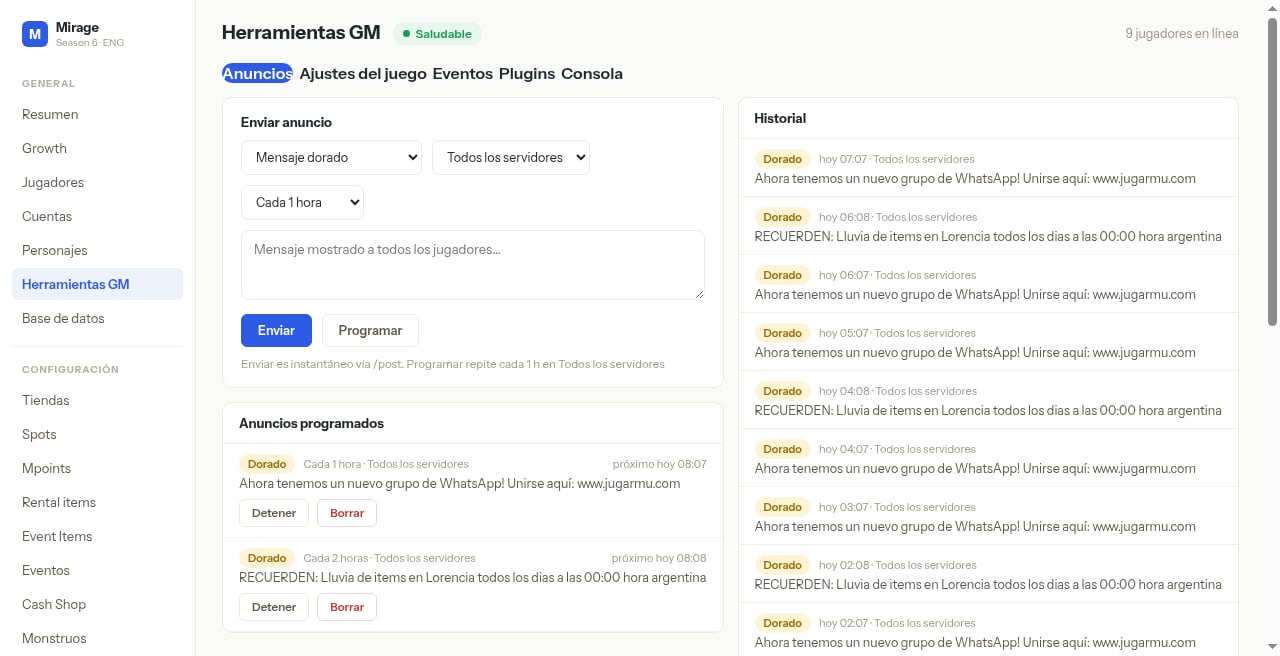 En esta pantalla fijate en el bloque **Enviar anuncio**: selects (p. ej. **Mensaje dorado**, **Todos los servidores**, **Cada 1 hora**), el textarea *Mensaje mostrado a todos los jugadores…*, el botón azul **Enviar**, **Programar**, y a la derecha el panel **Historial**.
## Qué hacer
Abrí **GENERAL → Herramientas GM → Anuncios**.
Elegí tipo, servidores y escribí el mensaje.
Pulsá **Enviar** (instantáneo vía /post, según la nota de la UI).
Verificá en **Historial**.
## Si ves esto…
| Síntoma | Qué revisar |
| ---------------------------- | ------------------------------------------------- |
| Anuncio no llega a jugadores | Verificá tipo, alcance de servidores e Historial. |
En esta pantalla fijate en el bloque **Enviar anuncio**: selects (p. ej. **Mensaje dorado**, **Todos los servidores**, **Cada 1 hora**), el textarea *Mensaje mostrado a todos los jugadores…*, el botón azul **Enviar**, **Programar**, y a la derecha el panel **Historial**.
## Qué hacer
Abrí **GENERAL → Herramientas GM → Anuncios**.
Elegí tipo, servidores y escribí el mensaje.
Pulsá **Enviar** (instantáneo vía /post, según la nota de la UI).
Verificá en **Historial**.
## Si ves esto…
| Síntoma | Qué revisar |
| ---------------------------- | ------------------------------------------------- |
| Anuncio no llega a jugadores | Verificá tipo, alcance de servidores e Historial. |