> ## Documentation Index
> Fetch the complete documentation index at: https://jugarmu.com/ayuda/llms.txt
> Use this file to discover all available pages before exploring further.
# ¿Qué es la sección Tiendas?
> Lista de mercaderes y grilla 8×15
## Miralo en la captura
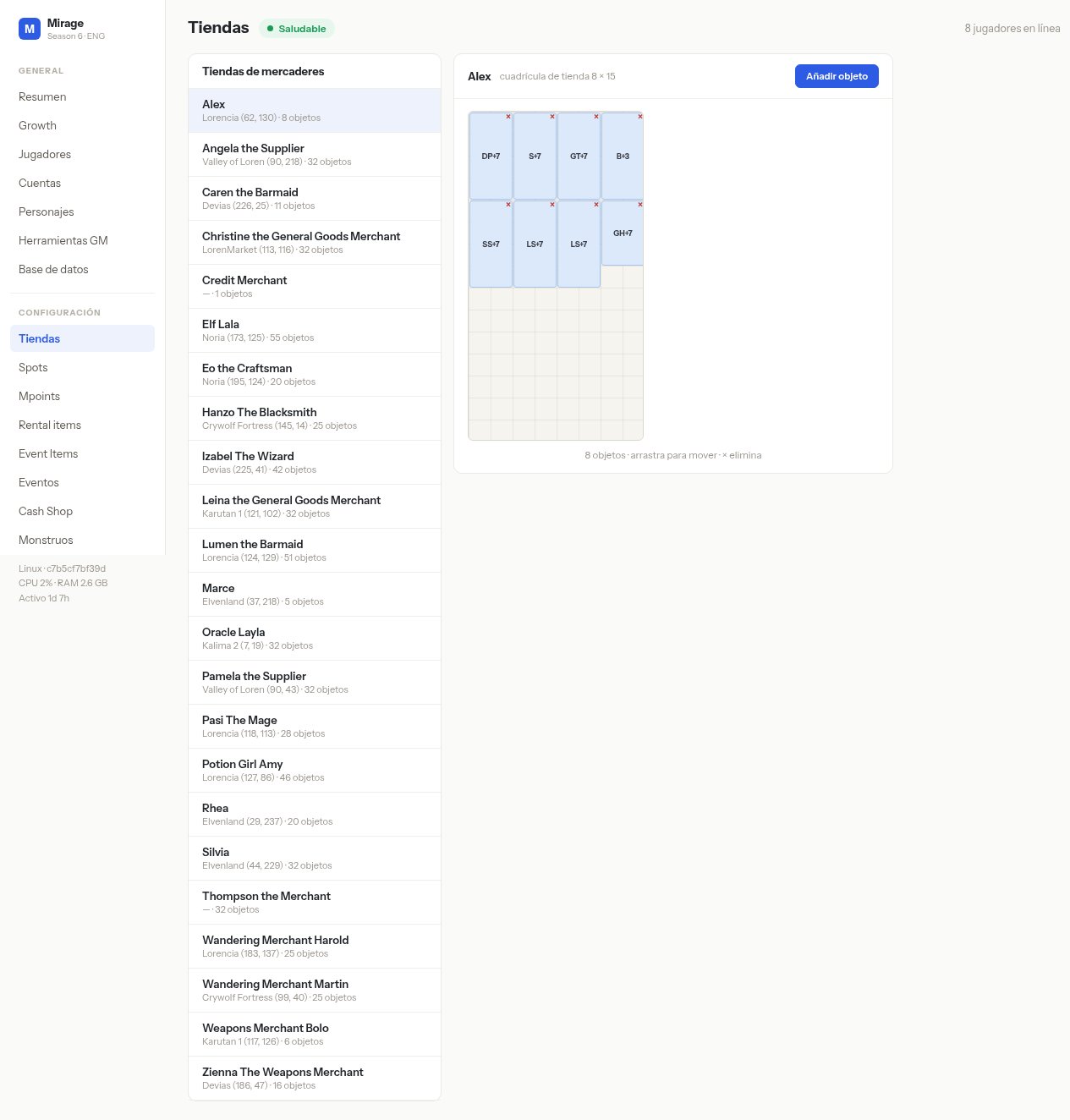 En esta pantalla fijate en: **Tiendas de mercaderes** (nombre, mapa + coords, cantidad de objetos) y la grilla derecha «cuadrícula de tienda 8 × 15» con el botón **Añadir objeto** y el pie «arrastra para mover · x elimina».
## Qué hacer
Andá a **CONFIGURACIÓN → Tiendas**.
Seleccioná un mercader de la lista para ver su inventario.
En esta pantalla fijate en: **Tiendas de mercaderes** (nombre, mapa + coords, cantidad de objetos) y la grilla derecha «cuadrícula de tienda 8 × 15» con el botón **Añadir objeto** y el pie «arrastra para mover · x elimina».
## Qué hacer
Andá a **CONFIGURACIÓN → Tiendas**.
Seleccioná un mercader de la lista para ver su inventario.