> ## Documentation Index
> Fetch the complete documentation index at: https://jugarmu.com/ayuda/llms.txt
> Use this file to discover all available pages before exploring further.
# ¿Cómo rento un objeto?
> Formulario Objeto / Nivel / Minutos
## Miralo en la captura
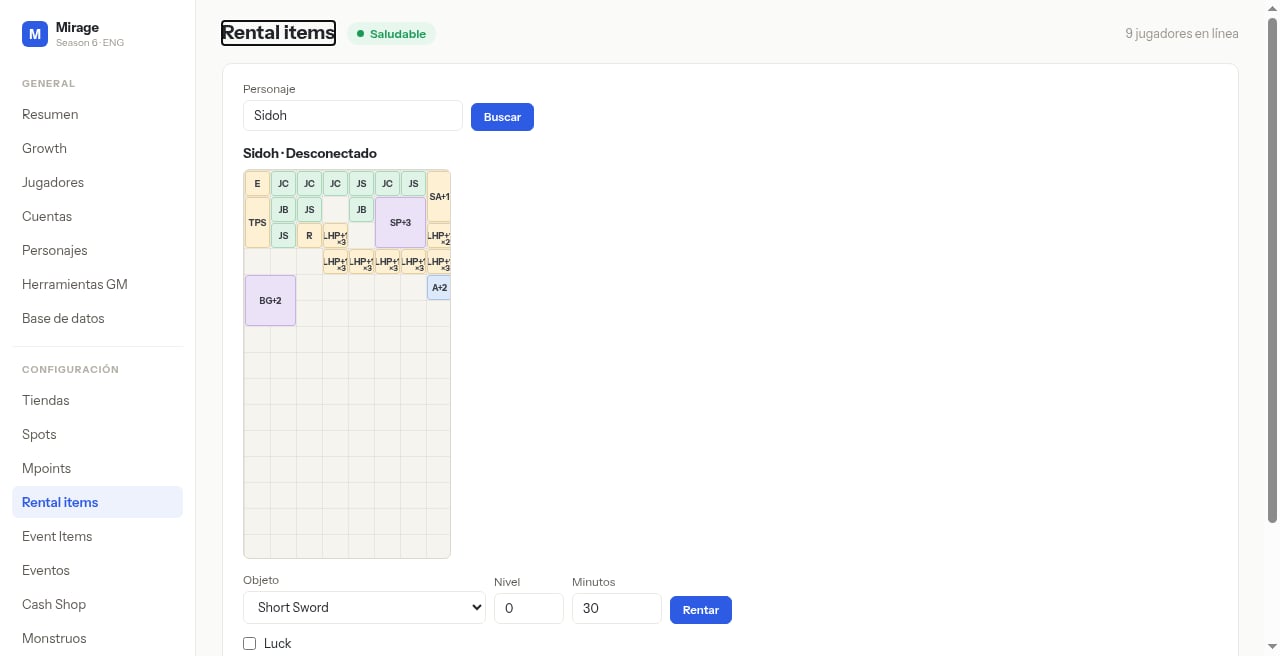 En esta pantalla fijate abajo: selector **Objeto**, **Nivel**, **Minutos**, casilla **Luck** y botón azul **Rentar**.
## Qué hacer
Con el inventario cargado, seleccioná **Objeto**, **Nivel** y **Minutos**.
Marcá **Luck** u otras opciones visibles si aplica.
Pulsá **Rentar**.
## Si ves esto…
| Síntoma | Qué revisar |
| ---------------- | ------------------------------------------------- |
| Inventario lleno | Liberá slots antes de rentar. |
| Rentar falla | Verificá objeto/nivel/minutos; confirmá permisos. |
En esta pantalla fijate abajo: selector **Objeto**, **Nivel**, **Minutos**, casilla **Luck** y botón azul **Rentar**.
## Qué hacer
Con el inventario cargado, seleccioná **Objeto**, **Nivel** y **Minutos**.
Marcá **Luck** u otras opciones visibles si aplica.
Pulsá **Rentar**.
## Si ves esto…
| Síntoma | Qué revisar |
| ---------------- | ------------------------------------------------- |
| Inventario lleno | Liberá slots antes de rentar. |
| Rentar falla | Verificá objeto/nivel/minutos; confirmá permisos. |