> ## Documentation Index
> Fetch the complete documentation index at: https://jugarmu.com/ayuda/llms.txt
> Use this file to discover all available pages before exploring further.
# ¿Cómo creo un listing nuevo?
> Nueva listing y Guardar
## Miralo en la captura
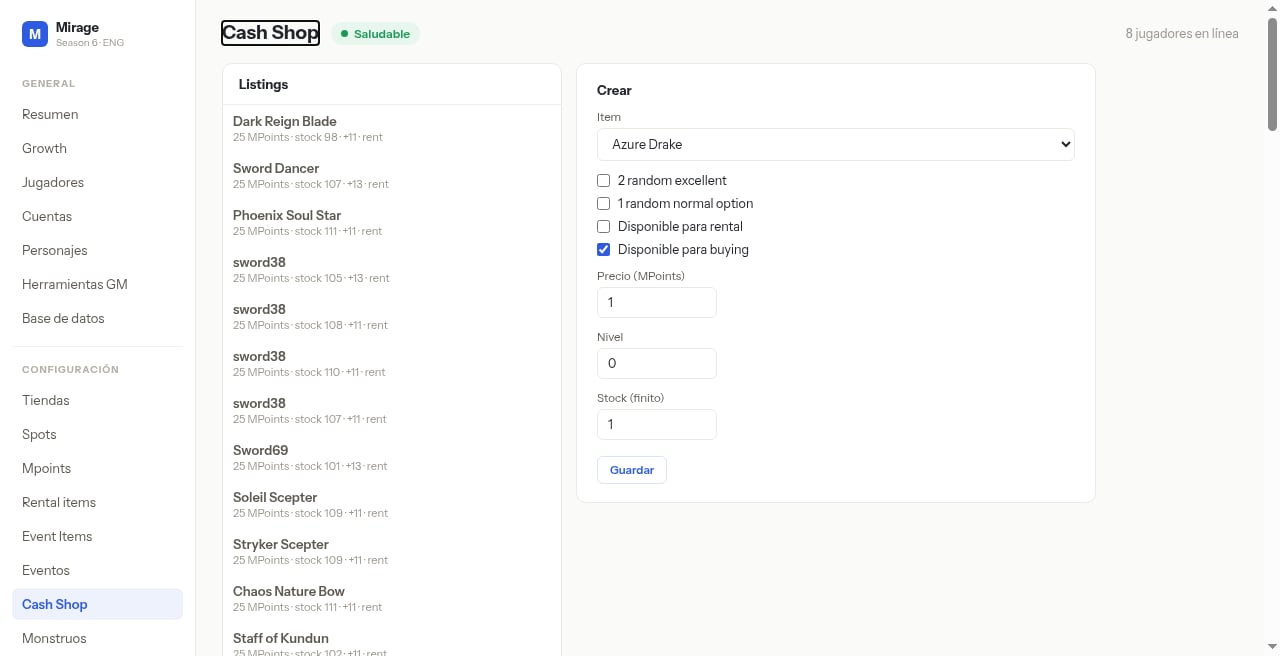 En esta pantalla fijate en el formulario **Crear**: selector **Item**, casillas **2 random excellent**, **1 random normal option**, **Disponible para rental**, **Disponible para buying**, campos **Precio (MPoints)**, **Nivel**, **Stock** y botón **Guardar**.
## Qué hacer
Abrí **Nuevo listing** / panel **Crear**.
Elegí **Item**.
Marcá casillas de opciones / disponibilidad.
Completá **Precio (MPoints)**, **Nivel**, **Stock**.
Pulsá **Guardar**.
## Si ves esto…
| Síntoma | Qué revisar |
| --------------------------- | -------------------------------------------------------- |
| Listing no aparece en juego | Confirmá Guardar y reinicios si aplica fuera de esta UI. |
| Stock 0 | Revisá el campo Stock del listing. |
En esta pantalla fijate en el formulario **Crear**: selector **Item**, casillas **2 random excellent**, **1 random normal option**, **Disponible para rental**, **Disponible para buying**, campos **Precio (MPoints)**, **Nivel**, **Stock** y botón **Guardar**.
## Qué hacer
Abrí **Nuevo listing** / panel **Crear**.
Elegí **Item**.
Marcá casillas de opciones / disponibilidad.
Completá **Precio (MPoints)**, **Nivel**, **Stock**.
Pulsá **Guardar**.
## Si ves esto…
| Síntoma | Qué revisar |
| --------------------------- | -------------------------------------------------------- |
| Listing no aparece en juego | Confirmá Guardar y reinicios si aplica fuera de esta UI. |
| Stock 0 | Revisá el campo Stock del listing. |